
Gmail app builder: apps on your inbox
Turn the inbox into a workflow. Build apps that sort, track and answer the emails that matter.
Brilliant’s Gmail integration builds apps that read and act on email, from a plain-words description.
The app searches messages and threads live, and with read and write access it drafts, sends and labels email for you. Sales, customer success and finance teams pair it with their CRM to see which deals went quiet, which leads got a first touch and which invoices need a reminder.
What Brilliant can do with Gmail
What Brilliant reads from Gmail
- Messages and threads, found by sender, label or words
- Labels and drafts
- Attachments on a message
- Your Google contacts
What an app can do in Gmail, with read and write access
- Draft, send and reply to email
- Add and remove labels, and move threads
- Forward messages
- Create labels and filters
Choose read-only or read and write when you connect Gmail. An automation can start when a new message arrives in Gmail, or when you send one.
Use cases that run on Gmail
Each of these apps reads from Gmail. Open one to see its prompt, the tools it runs on and how to build it.
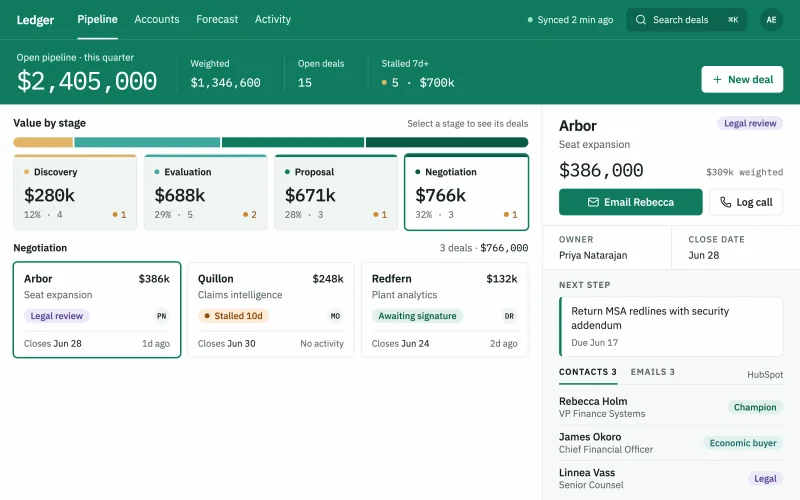 Deal pipelineEvery deal by stage, owner and close date, with the deals that went quiet pulled to the top.
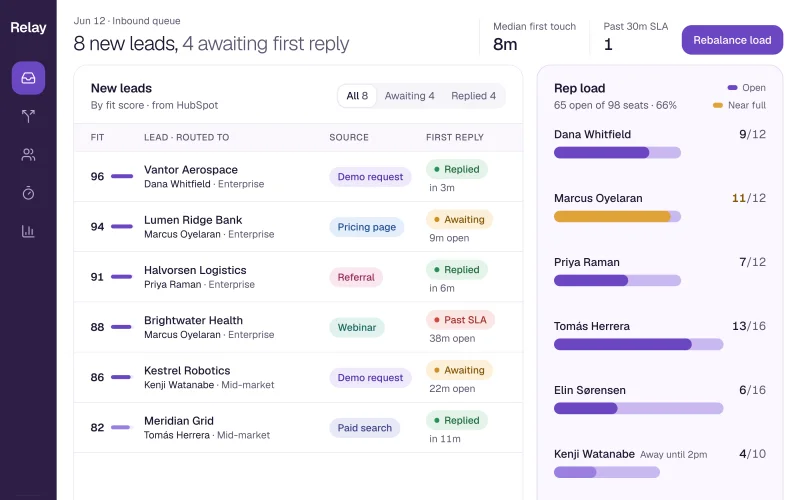 Lead routingInbound leads scored and assigned by territory and fit, with the uncalled ones in plain sight.
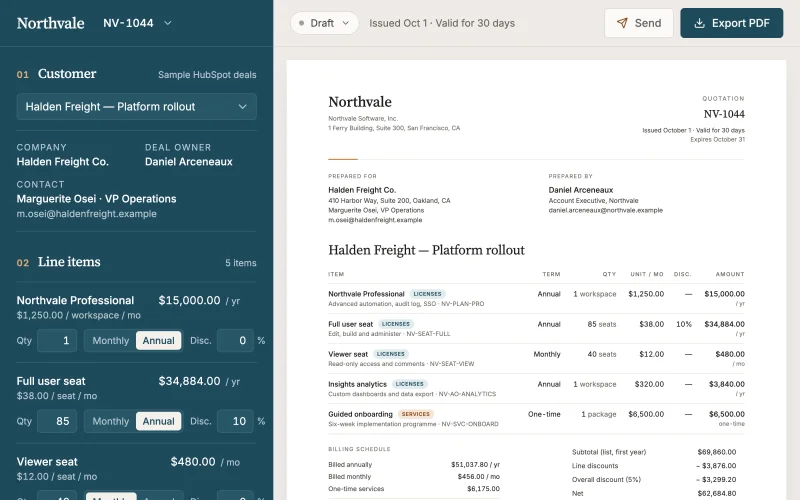 Quote builderStart from the deal, add products and discounts, and send a branded quote your customer can sign.
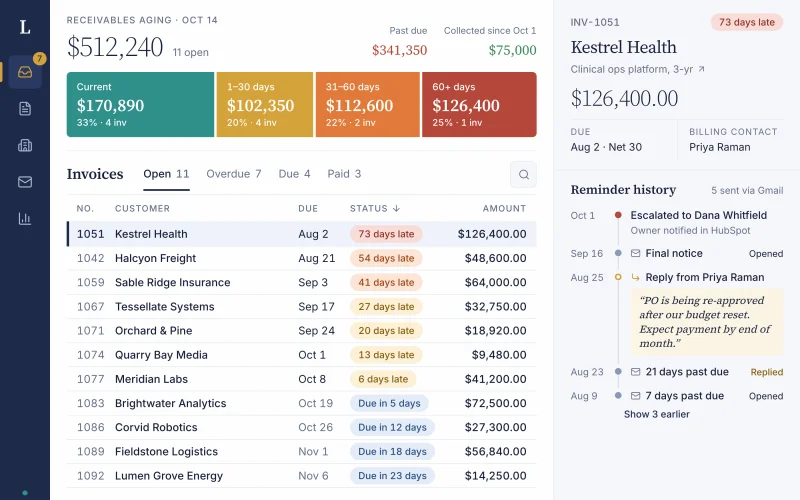 Invoices & collectionsEvery open invoice by customer and age, with overdue accounts and the next follow-up in one view.
Prompts to start from
Use one as it is, or change it to fit your team. Brilliant connects Gmail when it builds.
Build a stale-deals list that shows every open HubSpot deal with no Gmail email or meeting in 21 days, with owner, amount and close date.
Build an event follow-up list of every HubSpot contact from last week's event, with their company, owner and whether they got a Gmail follow-up.
Build a renewal tracker that lists every HubSpot contract renewing in the next 120 days, with owner, ARR and risk, and flags renewals with no Gmail touch in 30 days.
Works well with
The tools most often paired with Gmail in the use cases.
- HubSpotTogether in Deal pipeline, Lead routing, Quote builder, Invoices & collections
- monday.comTogether in Invoices & collections


Connect Gmail in three steps
Describe the app
Say what you need in plain words and name Gmail, or start from one of the prompts above. Brilliant asks a few quick questions, then builds the app.
Connect Gmail
Sign in with Google when Brilliant asks. Connect asks for nothing else. Choose read-only or read and write when you connect Gmail. An app can also ask each person to connect their own account. Once connected, every app you build can reuse the connection.
Share it with your team
Brilliant builds the app on your live Gmail data. Share it with your team and choose what each person can do with the app’s own records: view only, add new records, edit the records they created, or edit everything. Changes in Gmail follow the connection’s read-only or read and write access, for everyone who uses the app.
Frequently asked questions
Whose inbox does a Gmail app read?
The Gmail account connected to it. By default a Brilliant app uses one shared Gmail connection, and everyone you share the app with works through it. For an app where each person works from their own mail, the app can ask each person to connect their own Gmail account instead.
Can a Gmail app send email for me?
It can if you connect Gmail with read and write access. The app can then draft, send and reply to email, so a quote builder can draft the customer email and a collections tracker can draft reminders. Connected read-only, a Gmail app only searches and reads your messages.
Do I need to move my Gmail into Brilliant?
No. A Brilliant app reads Gmail live through the connection each time it loads, so your messages stay in your Gmail account and nothing is imported in bulk. Automations keep a run history, including the Gmail details a run used and what it sent. Notes or statuses the app adds live in its built-in database.